What you’ll learn
- What OCAP and CCAP mean.
- How Open Captions differ from Closed Captions.
- How DaCaPo displays subtitle type and language.
- How the active subtitle track is selected.
- How to change an unlocked track between OCAP and CCAP.
- Why CCAP conversion is available only for SMPTE Timelines.
- How multiple subtitle tracks are used in a Package.
What is OCAP?
OCAP means Open Captions.
Open Captions are rendered as part of the presentation and are visible to the entire audience.
They are commonly used for subtitle-language versions and for screenings where captions must always be visible.
What is CCAP?
CCAP means Closed Captions.
Closed Captions are intended for compatible cinema accessibility systems rather than being displayed directly on the main screen for the entire audience.
They are commonly used as an accessibility service for viewers who are deaf or hard of hearing.
OCAP and CCAP compared
| Property | OCAP | CCAP |
|---|---|---|
| Full name | Open Captions | Closed Captions |
| Audience | Entire audience | Users of compatible accessibility equipment |
| Main-screen visibility | Always visible during presentation | Not shown to the full audience |
| DaCaPo track type | OCAP | CCAP |
Subtitle track headers in DaCaPo
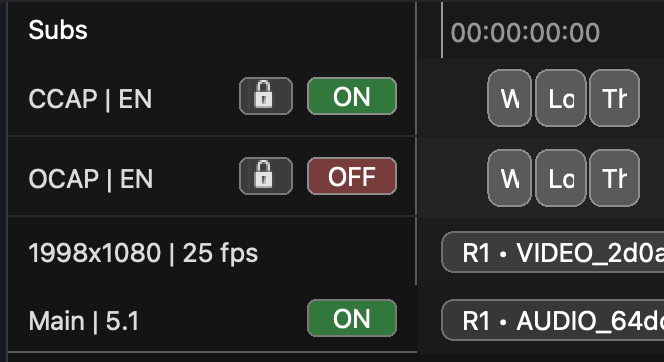
Each subtitle track header displays:
- Subtitle type: OCAP or CCAP
- Language
- Lock status
- Active-track status
This makes it possible to identify the purpose and state of each subtitle track directly in the Timeline.
The active subtitle track
The active subtitle track is the track currently being edited.
Track Tools operations such as changing language, changing type, or deleting a subtitle track apply to the currently active unlocked track.
Changing the subtitle language
In Track Tools, the language button is named Language OCAP or Language CCAP, depending on the active track type.
Use it to change the language assigned to the active unlocked subtitle track.
The language affects how the track is identified in the project and during export.
Changing OCAP to CCAP or CCAP to OCAP
Track Tools provides:
- Change OCAP to CCAP
- Change CCAP to OCAP
The button name changes according to the active unlocked subtitle track.
Use the function when the subtitle events should remain in the Timeline but the delivery type must change.
SMPTE and IOP considerations
Changing between OCAP and CCAP is available only when the current Timeline is SMPTE.
If the conversion control is unavailable, confirm the Timeline package profile as well as the track lock and active status.
Multiple subtitle tracks
A Package can contain Timelines with different subtitle languages and subtitle types.
For example:
- An OCAP subtitle version for a general audience.
- A CCAP accessibility version.
- Several language-specific subtitle versions.
DaCaPo keeps these versions organized as separate Timelines inside the Package.
Importing OCAP and CCAP subtitles
DaCaPo can import SMPTE XML, Interop XML, Subtitle MXF, and SRT subtitle files.
During the import workflow, review the created track type, language, and Timeline destination.
Export considerations
Before export, confirm:
- The correct subtitle track is present.
- The track type is OCAP or CCAP as required.
- The language is correct.
- The subtitle timing is valid.
- The target package profile supports the selected track type.
- No subtitle errors remain in the Issues tab.
Export the Timeline as a VF when the subtitle version can reuse compatible picture and audio from the OV.
Common problems
The Change OCAP to CCAP button is unavailable
Confirm that the Timeline is SMPTE and that the OCAP track is active and unlocked.
The wrong subtitle track was changed
Check which track is active before using Track Tools.
The subtitle language is incorrect
Use Language OCAP or Language CCAP on the active unlocked track.
The CCAP version appears on the main screen
Review the track type and confirm that the Timeline contains CCAP rather than OCAP.
The imported track type is not what was expected
Review the imported source format and the track created by the import workflow before export.