What you’ll learn
- How to start verification of a DCP folder.
- What DaCaPo checks during verification.
- How encrypted DCPs are handled.
- When to use Skip Hash Test.
- When to use the Exhaustive JPEG2000 Pass.
- What Passed, Warning, Failed, and Skipped mean.
- How to filter the verification results.
- How to export an HTML verification report.
What does DCP verification do?
The DCP Verifier checks an existing DCP folder and reports any issues found in the package structure, metadata, media assets, and composition files.
The exact tests performed depend on the contents of the DCP.
Start a verification
To verify a DCP folder on disk, choose File > Verify DCP Folder....
DaCaPo also provides two other ways to start verification:
- Right-click a Timeline and choose Verify Timeline to verify the DCP associated with that Timeline.
- Enable Verify after export during export to automatically verify the newly created DCP when export finishes.
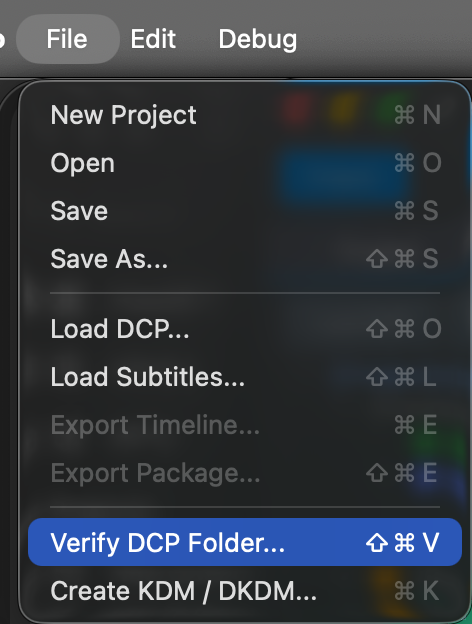
Choose the DCP folder
Select the DCP folder on disk that you want to analyse.
DaCaPo opens the verification window and begins checking the selected package.
Encrypted DCPs
When verifying an encrypted DCP, DaCaPo attempts to locate a suitable decryption key automatically.
If a compatible .dcpkey file is found next to the DCP, it is
loaded automatically.
Otherwise, you can manually provide a:
.dcpkey- KDM
- DKDM
- Digest XML
- Other supported key file
Providing a key allows DaCaPo to perform additional validation of encrypted assets.
Skip Hash Test
The hash test verifies that the SHA-1 hash values stored in the PKL match the actual files on disk.
This is one of the most thorough integrity checks, but it can also be one of the most time-consuming, especially for large feature-length DCPs.
If the media files have already been verified and are known to be unchanged, enable Skip Hash Test to omit file hash verification while still running all remaining verification checks.
This can be particularly useful when verifying a Version File that references picture and audio assets from an already verified Original Version package.
Exhaustive JPEG2000 Pass
Standard verification performs a fast validation of picture assets by checking a selection of JPEG2000 frames.
The Exhaustive JPEG2000 Pass performs a much deeper validation by checking every frame in every picture MXF.
This can take considerably longer to complete, especially for feature-length content, but provides the highest level of confidence that the picture assets are free from JPEG2000 encoding or corruption issues.
What is verified?
DaCaPo performs a wide range of structural and compliance checks, including:
- ASSETMAP, VOLINDEX, PKL, and CPL validation
- XML structure and schema validation
- Asset reference validation
- File existence checks
- PKL hash and file size verification
- Picture, audio, subtitle, and Atmos asset validation
- Composition metadata checks
- Marker validation
- Encryption and certificate checks
- Interop, SMPTE, and RDD52 compliance checks where applicable
The exact tests performed depend on the contents of the DCP.
Understand the verification results
Verification results are grouped into four categories:
Passed
The test completed successfully.
Warning
A potential issue was found, but the DCP may still be valid.
Failed
A problem was found that may prevent playback or cause the DCP to be non-compliant.
Skipped
The test was not applicable to the DCP.
For example, subtitle tests are skipped when the DCP does not contain subtitles.
The verification window displays the test results together with detailed information about any warnings or failures.
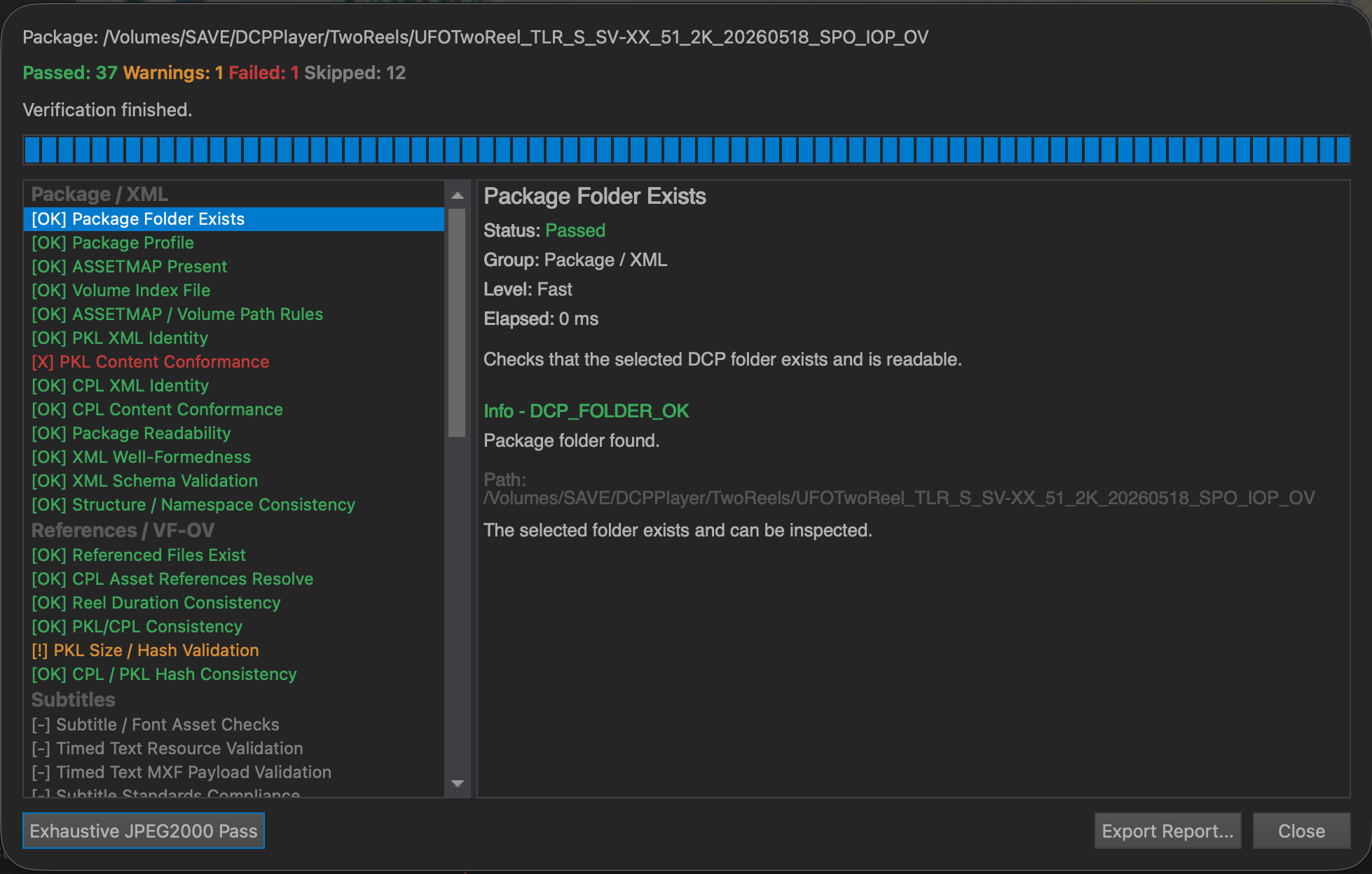
Filter the verification results
Use the Passed, Warning, Failed, and Skipped buttons to filter which results are displayed.
This makes it easier to focus on warnings or failures while reviewing a large verification result set.
Export the verification report
Click Export Report... to create an HTML report containing the complete verification results.
The report includes all passed, warning, failed, and skipped tests.
It can be shared with customers, facilities, distributors, or quality-control personnel.
Common problems
An encrypted DCP cannot be fully verified
Provide a compatible .dcpkey, KDM, DKDM, Digest XML, or other
supported key file so DaCaPo can perform additional validation of the
encrypted assets.
Verification takes a long time
PKL hash verification can take significant time because the media files must be read from disk. The Exhaustive JPEG2000 Pass takes even longer because every frame in every picture MXF is checked.
A test is shown as Skipped
Skipped means that the test was not applicable to the selected DCP. For example, subtitle tests are skipped when no subtitles are present.
I only want to review problems
Use the result filter buttons to hide Passed or Skipped tests and focus on Warning and Failed results.