What you’ll learn
- What a DCP decryption key is used for.
- Which key sources DaCaPo supports.
- How DaCaPo searches for a matching key automatically.
- What happens when you are asked to select a key.
- What happens if the key request is cancelled.
- How KDM and DKDM validity periods affect access.
- How DaCaPo stores key information.
- Why a key may need to be supplied again on another workstation.
What does a decryption key do?
An encrypted DCP contains assets that cannot be read without the corresponding decryption key.
A compatible key allows DaCaPo to decrypt the encrypted assets so the DCP can be played, inspected, edited, verified, or used when creating another delivery.
Loading a key does not remove encryption from the source DCP. The original DCP remains encrypted.
Supported key sources
DaCaPo can obtain DCP decryption information from several supported key sources, including:
- DaCaPo DCPKey files (
.dcpkey) - KDM files
- DKDM files
- Digest XML files
- Other compatible XML-based key files
Load the encrypted DCP
Choose Load DCP and select the encrypted DCP.
DaCaPo reads the package and determines that decryption keys are required for its encrypted assets.
Before completing the load, DaCaPo checks whether a compatible usable key can be found automatically.
Automatic key loading
When loading an encrypted DCP, DaCaPo first checks whether a matching
.dcpkey file can be found automatically.
If a matching usable DCPKey is found, DaCaPo uses it and continues loading the DCP without asking you to select a key manually.
If no usable key is found, DaCaPo asks you to select a compatible key file.
Select a decryption key when requested
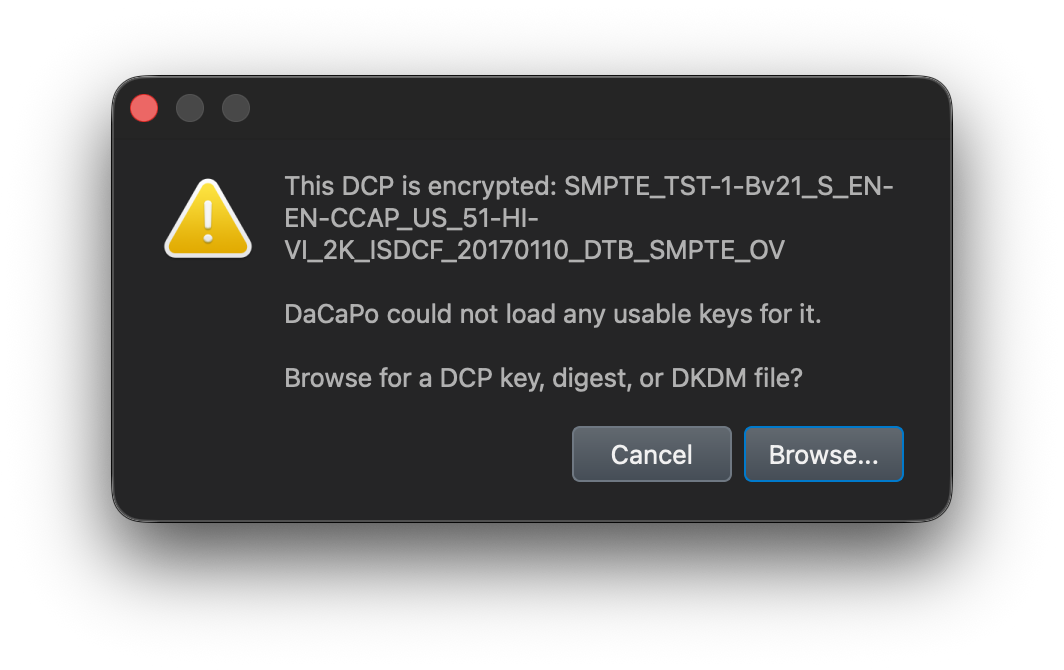
If DaCaPo cannot find a usable key automatically, it asks you to select a compatible decryption key.
Select the DCPKey, KDM, DKDM, digest, or other supported key file associated with the encrypted DCP.
DaCaPo checks whether the selected file contains the required keys and can be used on the current workstation.
What happens if you cancel?
If DaCaPo requires a decryption key while loading an encrypted DCP and you click Cancel, the DCP is not loaded.
DaCaPo does not add a newly loaded encrypted Timeline to the project and leave it locked while waiting for a key.
To load the DCP, start the load again and provide a compatible usable key when requested.
KDM and DKDM validity periods
KDMs and DKDMs normally contain a Start Time and End Time.
The key can be used only while its validity period allows access.
Not yet valid
If the Start Time has not yet been reached, the KDM or DKDM cannot currently be used to decrypt the content.
Expired
If the End Time has passed, the KDM or DKDM can no longer decrypt the content.
A Timeline that was previously loaded into a project can remain visible when the project is opened after its key has expired. In that case, the Timeline is locked because the stored key is no longer usable.
A new KDM or DKDM with a suitable validity period is required to unlock the content again.
Certificate mismatch
A KDM or DKDM is encrypted for a particular recipient certificate.
A KDM or DKDM created for another workstation, server, projector, or mastering system cannot be used by the current DaCaPo workstation.
After the key is accepted
When DaCaPo accepts a compatible usable key, the DCP load is completed and its Timeline is added to the project.
You can then:
- Play and inspect the encrypted DCP.
- Review picture, audio, subtitles, and metadata.
- Edit the Timeline where permitted.
- Verify the package.
- Create a KDM or DKDM from the unlocked encrypted Timeline.
- Use the Timeline when creating another delivery.
How DaCaPo stores key information
Accepted decryption information is stored securely on a per-computer basis.
The key information associated with a Timeline is encrypted for the local workstation and is not stored as plain text inside the project.
This allows DaCaPo to reuse the accepted key when the same project and DCP are opened again on that workstation, provided the key is still usable.
Opening the project on another workstation
Decryption information stored for one computer cannot automatically be used on another computer.
When a project containing an encrypted Timeline is opened on another workstation, DaCaPo asks for a compatible key again.
After the key has been accepted, that workstation stores its own encrypted key information for future use.
For a KDM or DKDM, the file must also have been created for the certificate belonging to the workstation that will use it.
Encryption status
DaCaPo displays an encryption status symbol next to encrypted Timelines.
Usable key
A green indicates that a usable decryption key is available and the Timeline is unlocked.
Locked
A red indicates that the Timeline cannot currently be decrypted.
A Timeline already stored in a project can become locked if its previously usable decryption key is no longer valid, for example after a KDM or DKDM has expired.
Move the pointer over the status symbol to display more information about its current state.
Common problems
DaCaPo asks me for a key when I load the DCP
DaCaPo could not find a compatible usable key automatically. Select the appropriate DCPKey, KDM, DKDM, digest, or other supported key file.
I clicked Cancel and the Timeline did not appear
This is expected. DaCaPo requires a usable decryption key before a newly loaded encrypted DCP is added to the project.
The selected key does not unlock the DCP
Confirm that the key belongs to the correct encrypted DCP and contains the required asset keys.
The KDM or DKDM is not yet valid
Check its Start Time. It cannot be used before its validity period begins.
A Timeline that worked before is now locked
Check whether the KDM or DKDM stored for the Timeline has expired. A Timeline already present in a saved project can remain visible even when its previously usable key is no longer valid.
The key works on one computer but not another
Stored key information is computer-specific. Supply a compatible key again on the second workstation.
For a KDM or DKDM, confirm that it was created for the second workstation's public certificate.
The DCP cannot be opened even though the key is correct
Check that the source DCP and all required assets are still available. A valid decryption key cannot restore missing source media.