What you’ll learn
- How to load a feature DCP and a separate logo DCP.
- Why the Timelines must be compatible.
- Why duplicating the feature Timeline is recommended.
- How to copy and paste a complete reel.
- How to insert the logo before the feature.
- What happens to subtitles when a reel is copied.
- How to review, export, and verify the new composition.
Workflow overview
- Load the feature DCP.
- Duplicate the feature Timeline.
- Load the logo DCP.
- Select and copy the logo reel.
- Return to the duplicated feature Timeline.
- Move the playhead to the first feature reel.
- Paste and choose Insert Before.
- Review the new reel structure.
- Export and verify the new DCP.
The Timelines must be compatible
Reels can be copied between compatible Timelines.
The source and destination Timelines must use the same:
- Package profile
- Resolution
- Frame rate
Load the feature DCP
Use Load DCP and select the feature package.
Select the Timeline that should receive the distributor logo.
Duplicate the feature Timeline
Create a duplicate before changing the reel structure.
This keeps the original feature composition available and creates a separate Timeline for the logo version.
Load the logo DCP
Use Load DCP again and select the DCP containing the logo.
DaCaPo adds the logo DCP as its own Package or related Timeline, depending on its package relationships.
Open the Timeline containing the logo reel.
Select the logo reel
Select the video or audio reel in the logo Timeline.
Copying the reel transfers the compatible reel content and structure.
Copy the reel
Press Ctrl/Cmd+C or choose Edit > Copy.
DaCaPo stores the selected reel for pasting into a compatible Timeline.
Return to the feature Timeline
Open the duplicated feature Timeline.
Move the playhead to the first feature reel, where the logo should be inserted.
Paste the copied reel
Press Ctrl/Cmd+V or choose Edit > Paste.
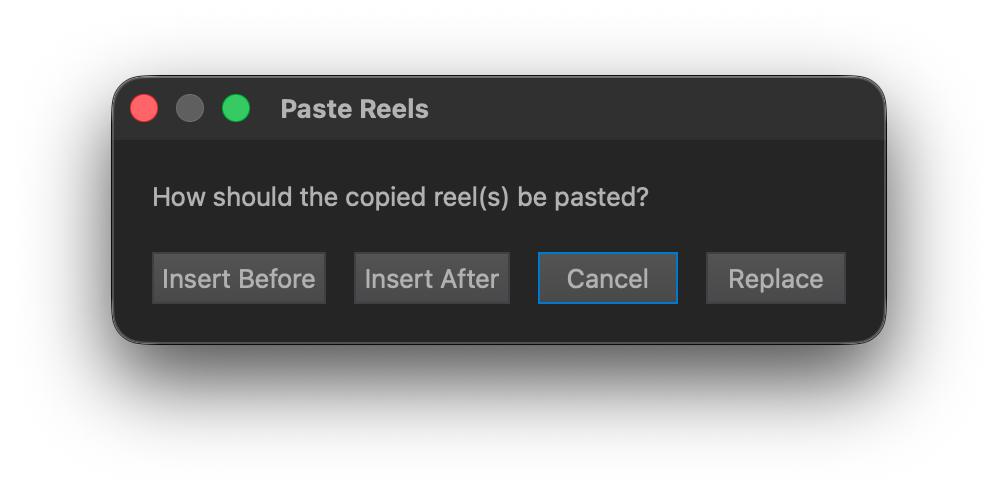
DaCaPo asks how the copied reel should be applied at the playhead position.
Choose Insert Before
The available paste choices are:
- Insert Before
- Insert After
- Replace
To place the distributor logo before the main feature, choose Insert Before.
DaCaPo inserts the copied reel and moves the existing feature reels later in the Timeline.
Subtitle handling
If the copied reel contains subtitles, those subtitles are copied with the reel.
If the destination Timeline does not contain a compatible subtitle track, DaCaPo asks whether one should be created automatically.
A typical logo reel contains no subtitles, but review the destination Timeline after pasting.
Review the edited Timeline
Check:
- The logo is the first reel.
- The feature begins immediately after the logo.
- Picture and audio are present in both reels.
- Frame rate, resolution, and package profile remain consistent.
- Subtitles and markers remain correctly positioned.
- The total duration is correct.
- No errors appear in the Issues tab.
Trim the logo reel if required
Enable Trim mode if the copied reel needs a shorter start or end.
Drag the beginning or end of the reel to perform a ripple trim. Following Timeline content moves accordingly.
A reel can be extended only when additional source media is available.
While trimming, DaCaPo shows outgoing and incoming frames in the Trim Preview.
Export and verify the logo version
Because the reel structure has changed, review whether the delivery should be exported as a new OV or as a VF that reuses compatible assets.
Export the edited Timeline, enable Verify After Export, and perform playback QC across the logo-to-feature transition.
Common problems
Paste is unavailable
Confirm that a reel was copied and the destination Timeline is compatible.
The logo DCP cannot be pasted into the feature
Check package profile, resolution, and frame rate.
The logo replaced the first feature reel
Use Insert Before rather than Replace.
Subtitles were added unexpectedly
The copied reel contained subtitle content. Review the destination tracks.
The transition is not correct
Review the reel boundary and trim the logo reel if necessary.
The original feature Timeline was changed
Use a duplicate Timeline for the logo version.