What you’ll learn
- What a Project represents.
- What a Package represents.
- What a Timeline represents.
- How DCPs and CPLs are organized in DaCaPo.
- Why Packages are useful for OV and VF workflows.
- How this structure simplifies complex deliveries.
The DaCaPo hierarchy
DaCaPo uses three levels to organize work:
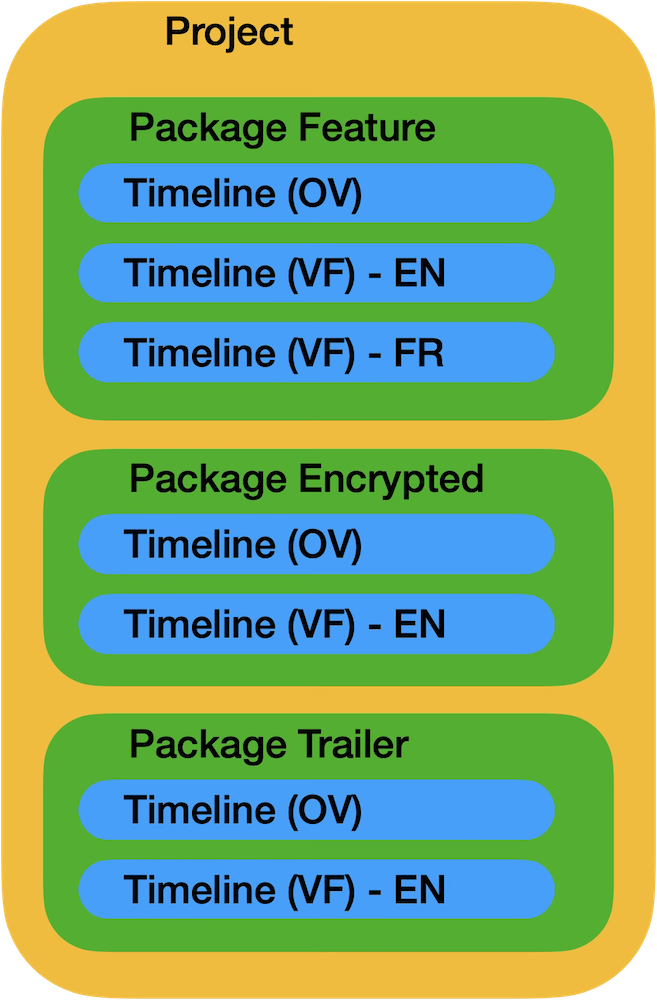
Each level has a different purpose:
- A Project is the top-level container for the complete production.
- A Package groups related DCP timelines.
- A Timeline represents one CPL.
Projects
A Project represents the complete production or body of work.
A project may be used for a feature film, trailer campaign, commercial, festival delivery, restoration, or event-cinema release.
A single project can contain several packages. For example:
- Feature SMPTE
- Feature Interop
- Trailer SMPTE
- Trailer Interop
- Festival versions
- Domestic and international deliveries
Packages
A Package is a DaCaPo organizational concept used to group DCP timelines that belong together.
A Package is not the same thing as a DCP folder on disk, and it is not part of the DCP specification. It exists inside DaCaPo to make real-world versioning and delivery work easier to manage.
A typical feature package might contain:
- Original Version English 5.1
- French Subtitle VF
- German Subtitle VF
- Swedish Subtitle VF
- HI accessibility version
- VI-N accessibility version
- Alternative audio version
- Corrected or updated release
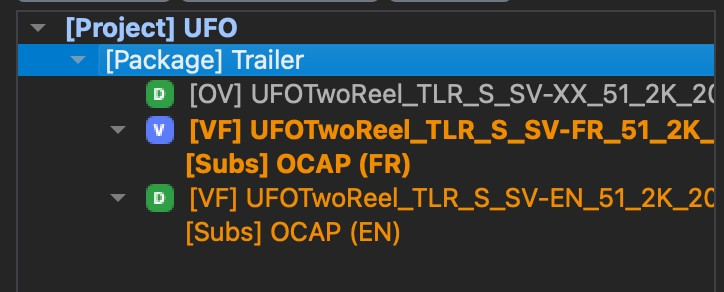
Many DCP authoring applications treat every language version, accessibility version, corrected release, or trailer as a separate project. As productions grow, it becomes increasingly difficult to see which DCPs belong together.
DaCaPo takes a different approach. Related timelines are grouped into Packages, making it easy to switch between versions, compare timelines, and manage an entire production without searching through dozens of unrelated projects.
Why Packages are useful
Without Packages, every DCP version can appear as a separate, unrelated project. That quickly becomes difficult to manage when a production has several languages, accessibility versions, or corrections.
Packages keep the relationships visible. Instead of searching through several independent projects, you open the Package and see every related composition together.
This is especially useful when:
- Several VFs reference the same OV.
- The same film exists in SMPTE and Interop deliveries.
- Trailers must be kept separate from the feature.
- Domestic and international versions must remain organized.
- Corrected versions need to stay connected to earlier releases.
Example project structure
A feature-film project might be organized like this:
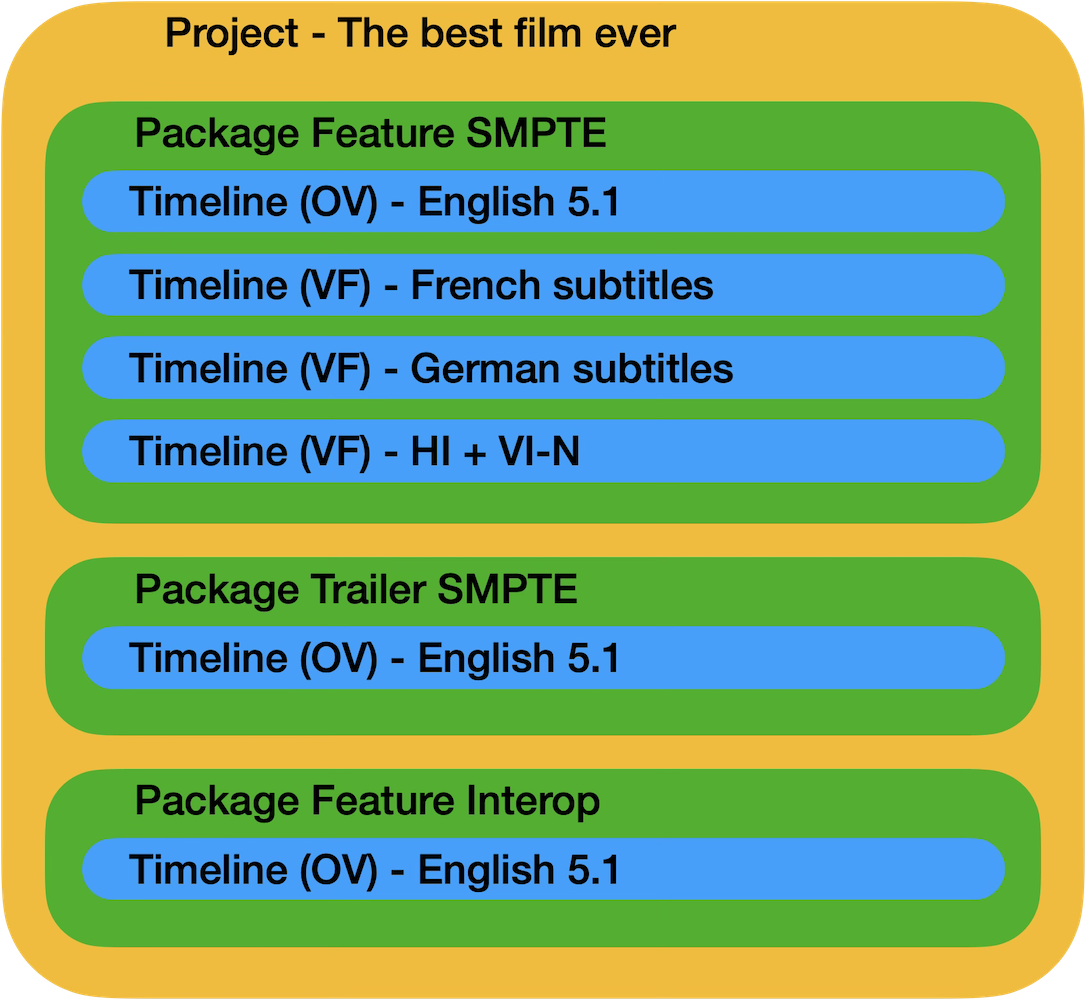
Although these are different deliveries, they all belong to the same production and can therefore remain inside one Project.
Timelines
A Timeline is DaCaPo’s representation of one Composition Playlist, or CPL.
When DaCaPo loads a DCP containing one CPL, it creates one Timeline. When a Multi-CPL DCP contains several CPLs, each CPL becomes a separate Timeline.
Every Timeline can be inspected and edited independently. You can:
- Add or edit subtitles.
- Replace picture or main audio.
- Add HI, VI-N, Atmos, or Sign Language tracks.
- Edit markers and metadata.
- Trim, split, copy, or delete reels.
- Export the Timeline as an OV or VF.
Timeline types
Timelines can exist in several states:
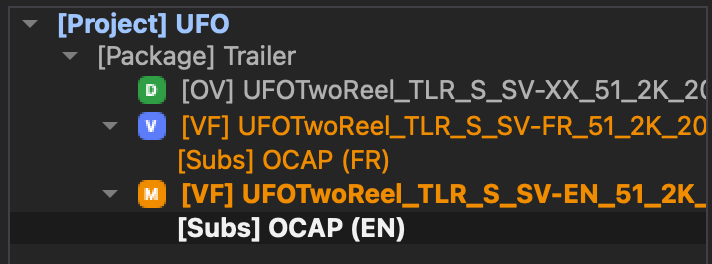
DCP Timeline
A DCP Timeline represents a CPL and DCP package that currently exists on disk. No unexported changes have been made.
Modified Timeline
A Modified Timeline is based on an existing DCP but contains changes that have not yet been exported.
The original DCP on disk is not changed. The edits exist only inside the DaCaPo project until a new DCP is exported.
Virtual Timeline
A Virtual Timeline exists only inside the DaCaPo project and has no DCP folder of its own on disk.
Virtual Timelines are useful for preparing subtitle, accessibility, language, or corrected versions before export.
Offline Timeline
A Timeline becomes offline when DaCaPo can no longer find the source DCP or required media files.
What happens when you load a DCP?
When a DCP is loaded, DaCaPo analyzes its CPLs, assets, metadata, and relationships to other DCPs.
DaCaPo then places the imported Timeline in an appropriate Package or creates a new Package when necessary.
When additional DCPs are loaded, DaCaPo attempts to identify shared assets and OV/VF relationships. Related versions can then be grouped together automatically.
Packages and OV/VF workflows
Packages are particularly useful when working with Original Versions and Version Files.
Several subtitle or accessibility VFs may reference the same OV. Keeping them in one Package makes the dependency and relationship clear.
What is exported?
Projects and Packages are used to organize work inside DaCaPo. They are not written into the DCP as proprietary structures.
A Timeline is exported as a standards-based DCP composition. When exporting a Package as a Multi-CPL delivery, selected Timelines become CPLs inside the exported DCP folder.
This means DaCaPo’s organizational model does not reduce compatibility with cinema servers or other DCP software.
Frequently asked questions
Is a Package part of the DCP standard?
No. A Package is a DaCaPo organizational concept used to group related Timelines.
Is a Package the same as a DCP folder?
No. A Package may contain several related DCP Timelines, each of which may represent a separate DCP or CPL.
Can a Project contain several Packages?
Yes. This is the intended structure for productions with different profiles, trailers, territories, or delivery requirements.
Can a Package contain several DCP Timelines?
Yes. A Package is specifically intended to keep related Timelines together.
Can a Package contain several OVs?
A Package may contain multiple related compositions, including more than one standalone delivery where that organization makes sense. In many workflows, however, a Package contains one OV and several related VFs.
Can I export a complete Package?
Yes. Export Package creates a Multi-CPL OV package from selected exportable Timelines in the active Package.
What happens if the source files are moved?
The Package or individual Timelines may become offline. Restore the original storage or use Relink Package.