Desktop software for professional cinema workflows
DCP authoring, the easy way.
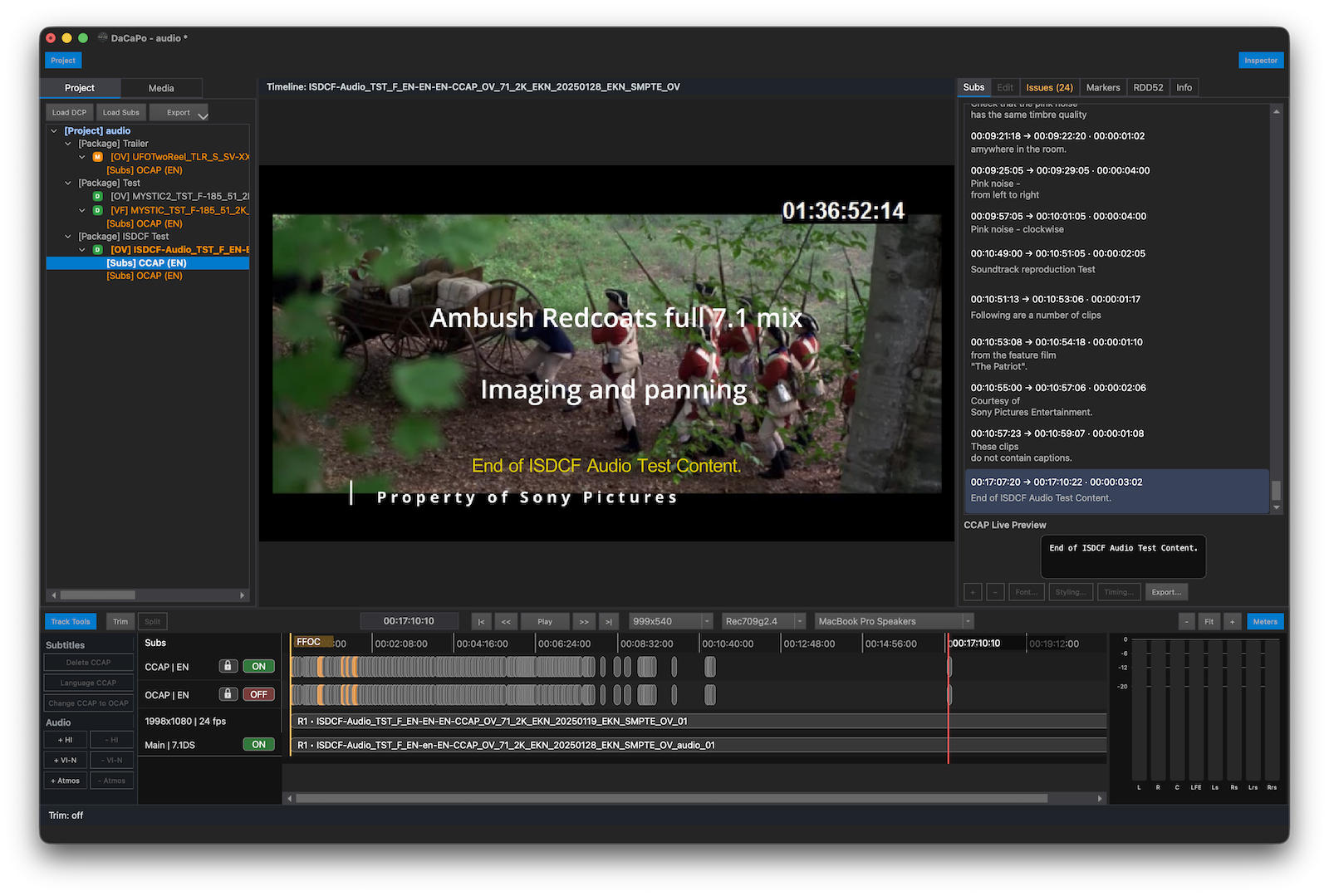
DaCaPo is a desktop application for creating, editing, versioning,
verifying, and delivering Digital Cinema Packages for professional
cinema workflows.
Create new DCPs or work directly with existing OVs and VFs, edit
subtitles, add accessibility, manage encryption and KDMs, and keep
related DCP versions together in one structured project.
Launch offer:
Use code LAUNCH50 for 50% off DaCaPo Pro Yearly
until October 31, 2026.
Want to try DaCaPo first?
Create a free account and generate a free Demo license from the DaCaPo Portal.
Work with existing DCPs
Open existing DCPs and continue working with them directly in DaCaPo.
Create new versions, edit subtitles, replace picture or audio assets,
add accessibility, and prepare new deliveries without starting over.
Project-based DCP workflow
Organize productions into Projects, Packages, and DCP Timelines.
Keep related OVs, VFs, language and accessibility versions together,
with IOP, SMPTE, and RDD 52 workflows in the same project.
From authoring to delivery
Edit and version DCPs, manage subtitles and accessibility, prepare
encrypted packages, create KDMs and DKDMs, and verify your DCPs
before delivery.
Watch the DaCaPo Introduction
Watch a short introduction to DaCaPo and see how DCP authoring,
editing, versioning, verification, and project-based workflows
work in practice.
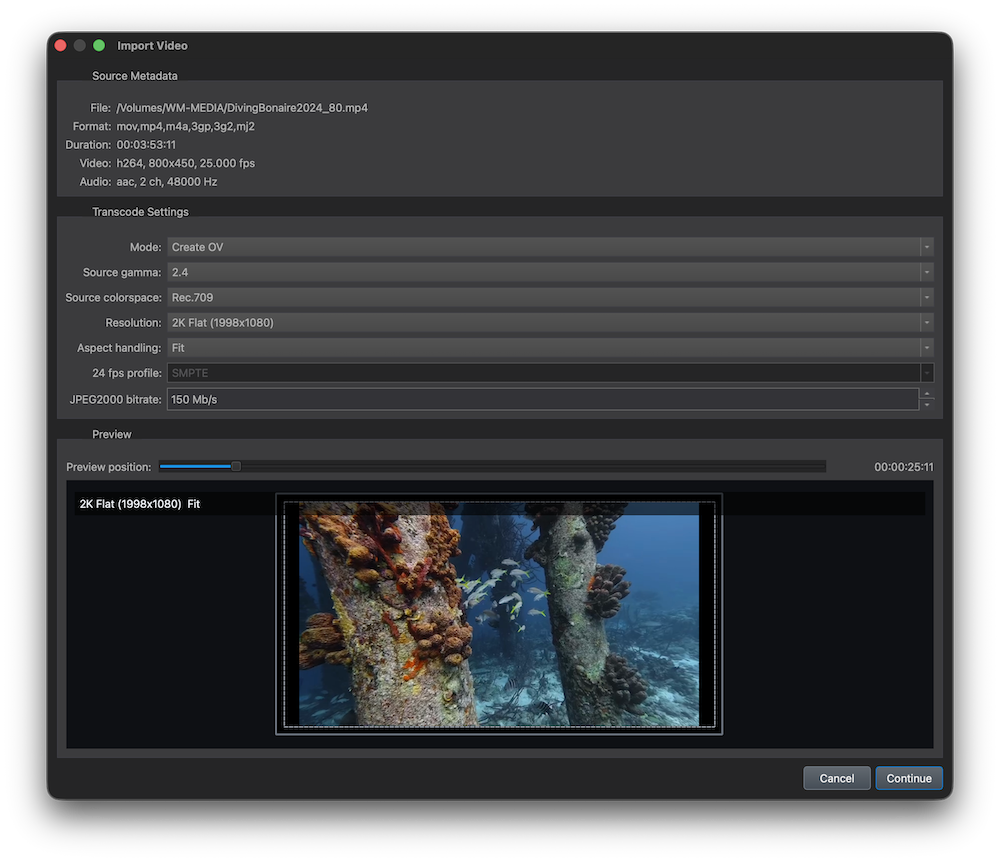
Import video files or numbered DPX, TIFF, PNG, and JPEG image sequences
and prepare them for DCP authoring. Choose the source colour space and
gamma, DCP resolution, framing, profile, and JPEG2000 bitrate.
Use Create OV to create a complete Original Version,
or Transcode Only to create replacement picture and
audio MXF assets for use in an existing DCP.
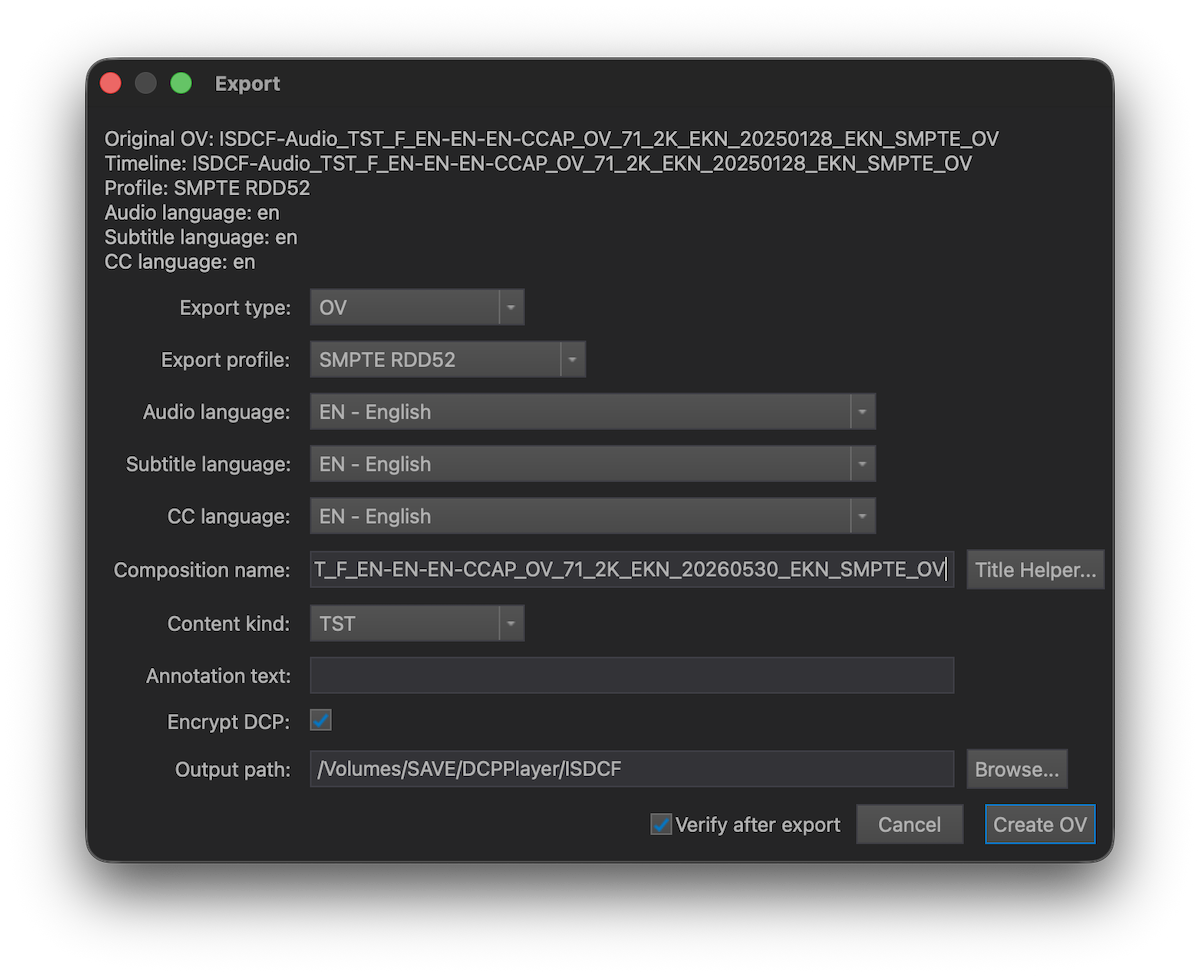
Export OV, VF, and Multi-CPL packages
Create new DCPs from existing timelines, export Original Versions or
Version Files, and build Multi-CPL packages for multiple language,
accessibility, or delivery variants.
Subtitles and accessibility
Import XML, subtitle MXF, SRT, and EBU STL subtitles, work with OCAP and
CCAP tracks, and edit subtitle text, timing, styling, and placement.
Still-image subtitles can be previewed and positioned directly, with
control over alignment, position, and fade in and out.
DaCaPo also supports HI and VI-N audio, Dolby Atmos, and Sign Language
Video workflows for SMPTE RDD52 packages.
Export Timeline Preview
Export the current Timeline as an H.264 video with stereo audio for
review, approval, and quality control. Optionally include subtitles
and customizable Burn-in text with control over position, size,
and opacity.
Sign Language (SMPTE RDD 52)
Create accessible DCPs with Sign Language Video support. Import a
Sign Language video, convert it to a DCP Sign Language MXF, place it
on the Timeline, and prepare SMPTE RDD 52 packages for cinema delivery.
Verification and delivery confidence
Verify existing DCP folders or project Timelines, or automatically verify
a DCP after export. DaCaPo checks package structure, metadata, assets,
subtitles, markers, hashes, encryption, and DCP compatibility.
Export the complete results as an HTML QC report for documentation
or sharing with customers and delivery partners.
Encryption and KDM workflows
Unlock encrypted DCPs with compatible keys, DKDMs, KDMs, or digest
files. Create KDMs and DKDMs for cinema servers, projectors, or
mastering systems.
Media and asset tools
Import video, image sequences, DCP MXF assets, WAV audio, Dolby Atmos,
and Sign Language Video. Replace picture or main audio, and add
accessibility and auxiliary assets to existing DCP workflows.
OV and VF versioning
Create Version Files from existing Original Versions and keep related
language, subtitle, accessibility, and delivery versions together.
Reuse existing assets where possible instead of rebuilding complete DCPs.
Try DaCaPo with the free Demo
Explore DaCaPo before purchasing with a free Demo license.
The Demo includes many of the tools available in DaCaPo Pro,
including encrypted DCP playback, timeline editing, subtitles,
accessibility workflows, and DCP export.
Demo licenses are valid for one year and can be used on one computer.
Some playback, export, verification, and delivery features are limited
or unavailable in the Demo edition.
A practical feature comparison of dedicated DCP authoring software.
The comparison focuses on workflow and built-in capabilities rather
than subjective claims about quality, speed, or ease of use.
Authoring
DaCaPo
DCP-o-matic
easyDCP
Create Original Version DCPs
Supported
Supported
Supported
Create Version Files
Supported
Supported
Supported
Multi-CPL packages
Supported
—
Supported
Project-based workflow
Supported
Partial
Partial
Timeline editing
Supported
—
Partial
Multiple timelines per project
Supported
—
—
Manage multiple DCPs in one project
Supported
—
Partial
Replace picture assets
Supported
Supported
Supported
Replace audio assets
Supported
Supported
Supported
Subtitles
DaCaPo
DCP-o-matic
easyDCP
SMPTE XML import
Supported
Supported
Supported
Interop XML import
Supported
Supported
Supported
SRT import
Supported
Supported
Supported
EBU STL import
Supported
Supported
—
Subtitle editor
Full editor
Basic
Limited
Subtitle retiming
Supported
Limited
Limited
Subtitle styling
Supported
Limited
Limited
Multiple subtitle tracks
Supported
Supported
Supported
Subtitle issue review
Built in
—
Partial
Accessibility & Audio
DaCaPo
DCP-o-matic
easyDCP
HI and VI-N audio
Supported
Supported
Supported
Dolby Atmos MXF
Supported
Supported
Supported
Sign Language Video
Supported
Supported
Supported
Audio channel mapping
Supported
Supported
Supported
Auxiliary audio tracks
Supported
Supported
Supported
Verification & Delivery
DaCaPo
DCP-o-matic
easyDCP
Package verification
Built in
Separate application
Separate application
Verify before export
Supported
Supported
Supported
Encryption
Supported
Supported
Supported
KDM and DKDM creation
Built in
Separate application
Separate application
SMPTE RDD 52 workflows
Supported
Supported
Supported
Export review movie
Supported
Supported
Supported
Integrated DCP player
Built in
Built in
Separate application
Application & Workflow
DaCaPo
DCP-o-matic
easyDCP
Applications required for a complete workflow
1
10+
3
macOS
Supported
Supported
Supported
Windows
Supported
Supported
Supported
Linux
—
Supported
—
Feature information is based on publicly available product information as
of September 2026 and may change as the applications are updated. "Partial" and
"Limited" indicate that a related workflow is available but differs in
scope or integration. Application count refers to the desktop applications
typically used for DCP authoring, playback, verification, KDM generation,
and related workflows.
What about DaVinci Resolve?
DaVinci Resolve Studio can export Digital Cinema Packages and is an
excellent choice for editing, colour grading, visual effects, and audio
post-production. Many facilities already use Resolve to create their
initial Original Version (OV) DCP.
There is no need to change that workflow. Import the finished OV into
DaCaPo and continue from there: create Version Files (VFs), manage
language and accessibility versions, edit subtitles, replace picture
or audio assets, prepare Multi-CPL packages, work with encryption and
KDMs, and verify DCPs before delivery.
If you prefer, you can also create the initial OV directly in DaCaPo.
 Desktop software for professional cinema workflows